HP OmniBook X 16 Review: Powerful and Quiet, with a Subpar Display
March 13, 2026
|
OmniBook X 16
Summary
This laptop is well built and its Panther Lake CPU performs well, but a few design choices like the grainy display make its value heavily dependent on price.
Table of contents:
Laptops in this Article
16 Inches | 1 TB | 32 GB | Core Ultra X7 358H | Arc B390
Best Price Ever
Great Deal
16 Inches | 1 TB | 32 GB | Core Ultra X7 358H | Arc B390
Solid Build, but Not Very Portable
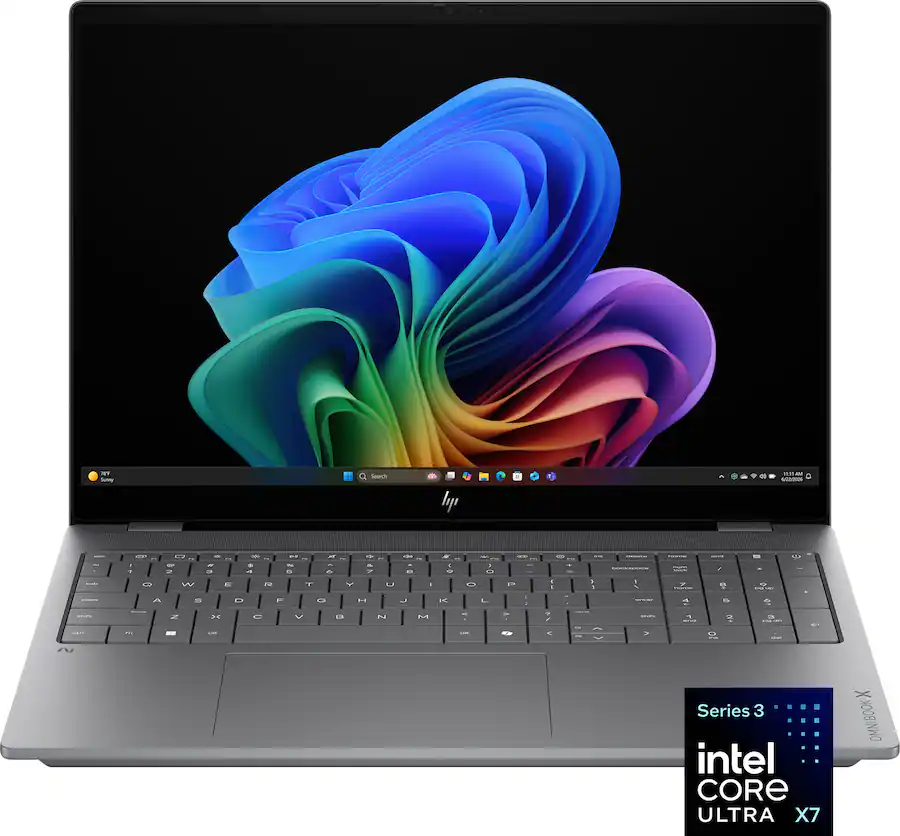
The OmniBook X 16 feels more robust than previous OmniBook X models. The keyboard deck is sturdy with minimal flex, and the display hinge is strong enough to support its touchscreen without wobbling. Overall build quality is respectable for a large productivity laptop.
That said, the design is fairly plain. The laptop has a boxy gray chassis with squared-off keys that give it a modern look, but visually it blends in with many other laptops on the market. At over 4.5 pounds, it’s also heavier than expected for a machine without a dedicated GPU. In fact, it’s heavier than some gaming laptops that deliver significantly more graphics power.
Because of this weight and its relatively thick chassis, the OmniBook X 16 doesn’t really qualify as a “thin and light.” It’s better thought of as a mobile workstation-style device.
A Disappointing Display
The biggest drawback of the OmniBook X 16 is its display.
HP includes a 2048×1280 OLED panel with a 120Hz refresh rate, which sounds impressive on paper. In practice, however, the resolution is simply too low for a 16-inch screen. Text and fine details can look soft, particularly for tasks like programming or working with spreadsheets.
On top of this, there is an issue in Best Power Efficiency mode where the display dims the outer edges of the screen in a sort of "vignette" pattern. It's distracting and it doesn't look great, which may come up if you're working unplugged.
There are some positives:
- Deep blacks and vibrant colors thanks to OLED
- A smooth 120Hz refresh rate
- Brightness above 400 nits
Unfortunately, the panel also exhibits a noticeable screen door effect, where pixel structure becomes visible on light backgrounds. Combined with the glossy coating and reflections in bright environments, the display ends up being the laptop’s weakest component.
If the display is important to you, options like the XPS or Acer Swift both offer better screens with the same processor.
16 Inches | 1 TB | 32 GB | Core Ultra X7 358H | Arc B390
Pros
- Premium design and build quality
- Excellent haptic trackpad
- Physical function row (vs previous model)
- Very good speakers
- Punchy Tandem OLED screen (on select models)
Cons
- Keyboard causes alot of typing errors and takes time to get used to
- Very few ports
- Feeds its CPU less power than other laptops do
- Expensive
Comfortable Keyboard and Solid Trackpad
Typing on the OmniBook X 16 is generally a good experience. The keys offer satisfying feedback and reasonable travel, and the slight spacing between keys helps reduce typing errors compared to tighter layouts like on the XPS.
However, HP shifted the keyboard slightly to the left to make room for a full number pad. This means the main keyboard keys are slightly narrower than usual, which can take some time to adjust to.
The mechanical trackpad performs well overall. It has a smooth surface and accurate tracking, with reliable clicks across most of the pad.
Good Port Selection
Connectivity is another strong point. The OmniBook X 16 includes:
- 2 × Thunderbolt 4 ports (with charging support)
- 2 × USB-A ports
- HDMI 2.1
- Headphone/mic combo jack
The included 100W charger is compact, and overall port selection should be sufficient for most users. The only drawback is that charging is limited to one side of the laptop.
Excellent Performance and Cooling
Where the OmniBook X 16 really shines is performance.
With Intel’s Panther Lake X processor, the laptop delivers excellent results in CPU benchmarks and performs better than other laptops we’ve tested with the same chip. HP appears to allow the processor to sustain higher power levels, which helps boost performance.
Despite that extra power, thermals remain impressive:
- The keyboard deck rarely exceeds 40 °C
- Most heat is concentrated near the number pad on the right
- Fan noise stays low during everyday tasks
For light productivity, the laptop feels extremely responsive and often runs cool and quiet. This is a welcome change from many high-performance Windows laptops.
Capable Integrated Graphics
The integrated B390 GPU performs surprisingly well for light gaming and creative workloads. In several benchmarks, it lands close to laptops with lower-wattage entry-level GPUs.
You can expect:
- Solid performance in many modern games at medium to high settings
- Good results in general graphics benchmarks
- Reasonable performance in creative apps like Photoshop and Premiere Pro
However, laptops with dedicated GPUs still maintain a clear advantage for demanding tasks like video editing or gaming on higher settings.
Battery Life
Battery life is respectable for a laptop of this size and performance level. In our testing, the OmniBook X 16 lasted around 10 hours in Best Power Efficiency, and 9 hours in Balanced mode without the dimming effect.
Performance on battery remains strong as well, retaining roughly 90% of its plugged-in performance, which is nice to see.
Verdict: A Good Laptop at the Right Price
The HP OmniBook X 16 has several strengths:
- Excellent CPU performance
- Very quiet and cool operation
- Solid build quality
- Good port selection
However, its low-resolution grainy display, heavy chassis, and mediocre speakers make it difficult to recommend at its current price.
Originally launched at $1,400, we thought this laptop was going to be found on sales closer to $1,000–$1,200, which would make it a compelling value. Unfortunately, recent price increases pushing it near $1,900 make it much harder to justify.
If the OmniBook X 16 returns to its earlier price range, it becomes an appealing option for users who want a powerful, quiet Windows laptop. At full price, though, there are simply better alternatives available.
16 Inches | 1 TB | 32 GB | Core Ultra X7 358H | Arc B390
Pros
- Powerful CPU performance
- Runs cool and nearly silent in most use cases
- Sturdy chassis with virtually no keyboard deck or screen flex
- Strong battery life at around 10 hours
- Good GPU performance, nearly matching lower-wattage dedicated GPUs
Cons
- Price hiked to nearly $1,900 during the review period, making it poor value
- Low resolution for a 16-inch panel, leading to text looking soft and fuzzy
- Heavy at over 4.5 lbs, more than many gaming laptops
- Noticeable screen door effect and glossy display causing reflections
- Keyboard shifted left for the numpad, making the main keys uncomfortably narrow